Ask any B2B performance marketer about LinkedIn Lead Gen Forms, and you will hear a familiar story: high conversion rates, low Cost Per Lead (CPL), and a sales team complaining that half the contacts “don’t remember submitting the form” or “aren’t actually interested.”
Because LinkedIn pre-fills form fields, such as full name, job title, work email, and company size, directly from a user’s profile, submitting a form requires just two taps on a mobile screen.
The friction is virtually zero. But that frictionless experience creates a double-edged sword:
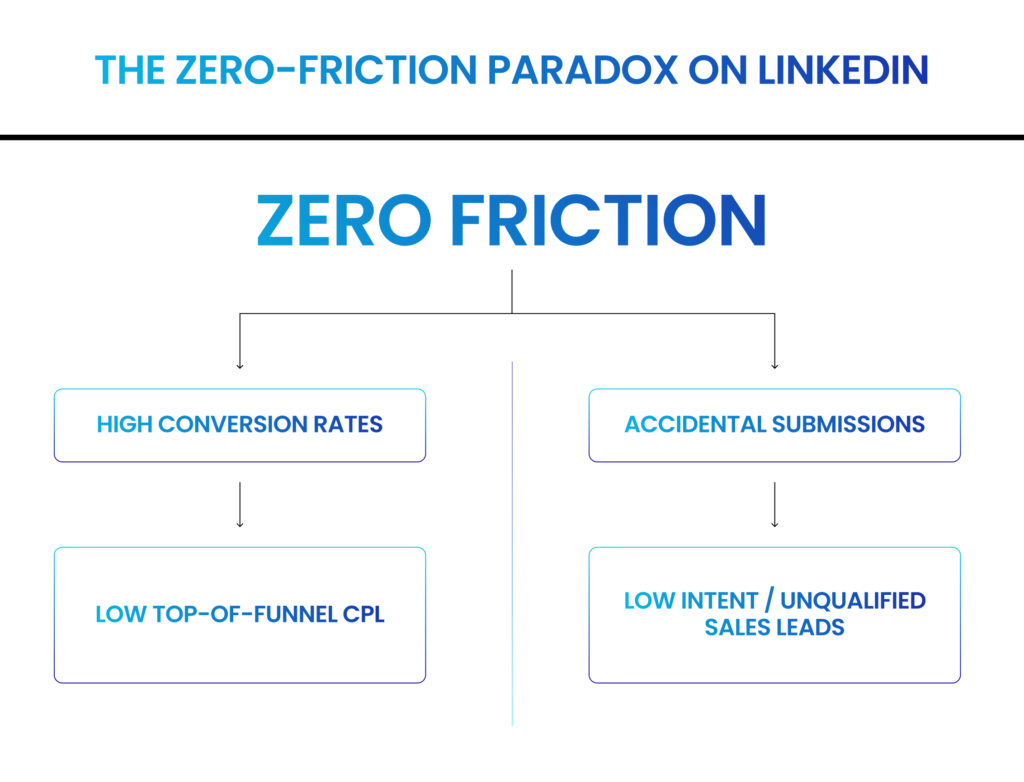
When sales teams report low lead quality, the default instinct is to add more custom questions to the form to “qualify” the buyer.
However, adding friction to a LinkedIn Lead Gen Form doesn’t automatically improve lead quality. It simply makes the form harder to complete.
If you add custom questions, you risk tanking your conversion volume without actually filtering for higher buying intent. Here is how to evaluate form friction, design strategic qualifying questions, and structure Lead Gen Forms that balance lead volume with genuine sales pipeline.
Why LinkedIn Lead Gen Forms Convert So Well (And Why It Backfires)
Traditional landing pages require users to manually type out their information on a form, hit submit, and wait for confirmation. That friction acts as a natural filter; only prospects with sufficient intent take the time to fill out every field.
LinkedIn Lead Gen Forms remove that friction entirely:
- Auto-Populated Profile Data: Name, job title, company name, location, and email address pull automatically from the member’s profile.
- In-App Mobile Experience: Users never leave the LinkedIn feed, avoiding slow-loading external landing pages or broken mobile layouts.
The result is a conversion rate often 2x to 3x higher than traditional website landing pages.
However, because the barrier to entry is so low, users frequently submit forms passively while scrolling through their feeds during a commute or break. When sales calls two days later, the prospect has forgotten they ever tapped “Submit.”
Short Forms vs. Long Forms: The False Trade-Off
When marketing teams try to fix low intent, they often stack their Lead Gen Forms with five or six extra custom questions: “What is your annual budget?” “What is your implementation timeline?”
While this drastically reduces form submissions, it doesn’t automatically mean the remaining submitters are better prospects.
![Short Form ] ──► High Volume ──► Low Intent Leads Included
[ Long Form ] ──► Low Volume ──► High Friction (Drives Away Busy Decision-Makers)](https://shivyaanchi.com/wp-content/uploads/2026/11/Frame-27244-1024x596.png)
High-value C-suite executives and senior decision-makers are often the most sensitive to form friction. If a busy VP of Revenue Operations sees an overly intrusive 8-field form on their mobile feed, they will close it instantly, even if they have a real problem your software solves.
Arbitrary friction doesn’t separate good prospects from bad prospects; it often separates patient prospects from busy ones.
Strategic Friction: How Custom Questions Actually Deliver ROI
The goal of adding custom questions isn’t to discourage people from completing the form. It is to force active cognitive engagement so the user consciously processes the offer and indicates true commercial intent.
To understand how strategic friction works, look at how two identical campaigns targeting the same $4,000 budget perform under different form structures:
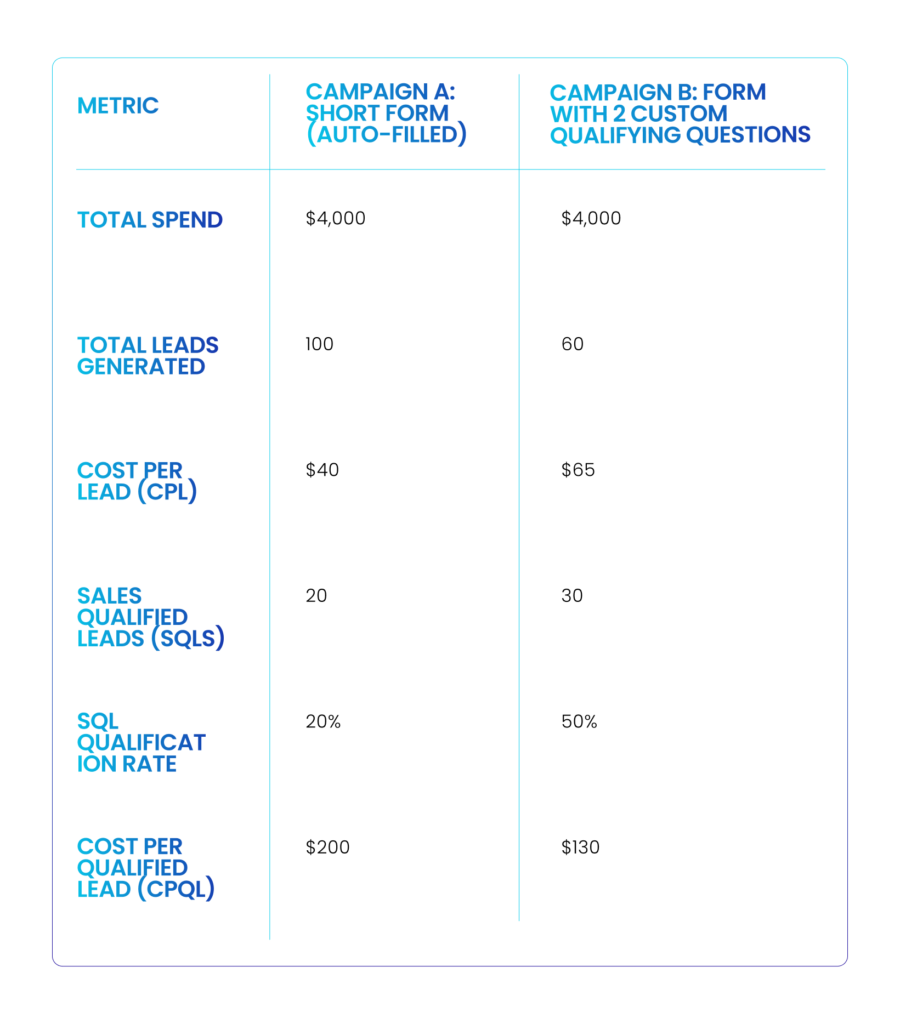
Even though Campaign B generated 40% fewer total leads and had a significantly higher top-of-funnel CPL ($65 vs $40), it generated 50% more qualified opportunities and reduced the Cost Per Qualified Lead from $200 down to $130.
Sales spent less time chasing dead ends and more time closing real deals.
What Qualifying Questions Should You Ask?
When introducing custom questions to a LinkedIn Lead Gen Form, avoid asking for information that LinkedIn already knows or that can be automatically enriched via your CRM
Instead, ask questions that reveal intent, urgency, and specific pain points:
1. Purchase Timeline
- “When are you looking to evaluate a solution?”
- Options:
- [Immediately (Within 30 Days)],
- [1–3 Months],
- [Just Researching]
- Options:
- Why it works: Instantly routes high-urgency prospects to sales while placing research-stage leads into automated marketing nurture sequences.
2. Specific Technical Challenge
- “What is your primary RevOps or advertising bottleneck today?”
- Options:
- [High Ad Acquisition Costs],
- [Poor CRM Data Quality],
- [Cold Email Deliverability],
- [Attribution Tracking]
- Options:
- Why it works: Forces the prospect to select their primary problem, giving your sales team a warm, highly relevant opening context for their first follow-up call.
3. Current Infrastructure / Tooling
- “Which CRM or marketing automation tool do you currently use?”
- Options:
- [HubSpot],
- [Salesforce],
- [Marketo],
- [None / Spreadsheets]
- Options:
- Why it works: Verifies software compatibility and helps identify whether the account fits your Ideal Customer Profile (ICP).
Align Form Friction with Offer Intent
Never apply a blanket form structure across all your campaigns. The amount of friction on a Lead Gen Form must directly match the intent level of the offer.
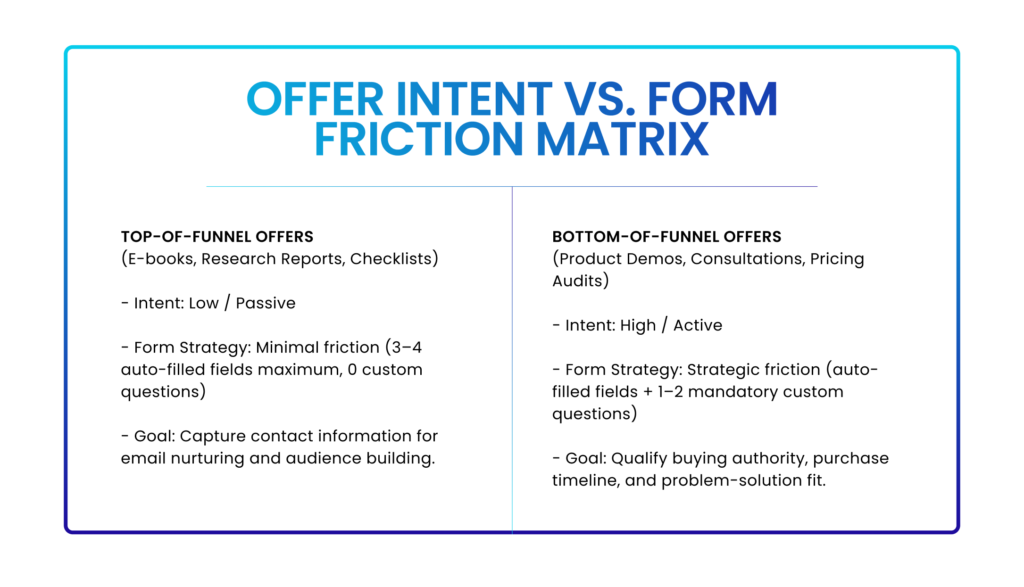
How to Test Form Variations
If your sales team complains about lead quality, don’t guess. Instead, run a controlled A/B split test inside LinkedIn Campaign Manager to verify whether extra fields improve downstream pipeline:
- Keep Every Variable Identical: Run two duplicate campaigns targeting the exact same audience, with identical budgets, ad creatives, copy hooks, and offers.
- Vary Only the Form:
- Control (Form A): Standard short form (Name, Work Email, Job Title).
- Challenger (Form B): Short form + 1 mandatory custom dropdown question (“Purchase Timeline”).
- Track Downstream CRM Outcomes: Do not stop tracking at the CPL stage. Evaluate both forms after 30 days based on MQL-to-SQL Conversion Rate and Cost Per Qualified Opportunity.
Quality Is Driven by Relevance, Not Just Friction
Adding extra fields to a LinkedIn Lead Gen Form is a tool to filter intent, not a substitute for poor audience targeting or weak ad messaging.
If your campaign targets the wrong job titles or presents an unconvincing value proposition, adding five custom questions will simply leave you with zero leads. But when paired with tight audience targeting and high-intent offers, strategic form friction ensures your sales team spends their time talking to buyers who are ready to close.
Is your team struggling to balance lead volume with lead quality on LinkedIn?
You can count on us (no, really). Because we’ve been doing this for the past 12 years. We build and manage B2B performance ad engines that optimize forms, targeting, and CRM workflows to drive true pipeline revenue.
Audit your LinkedIn Lead Gen Form strategy today.