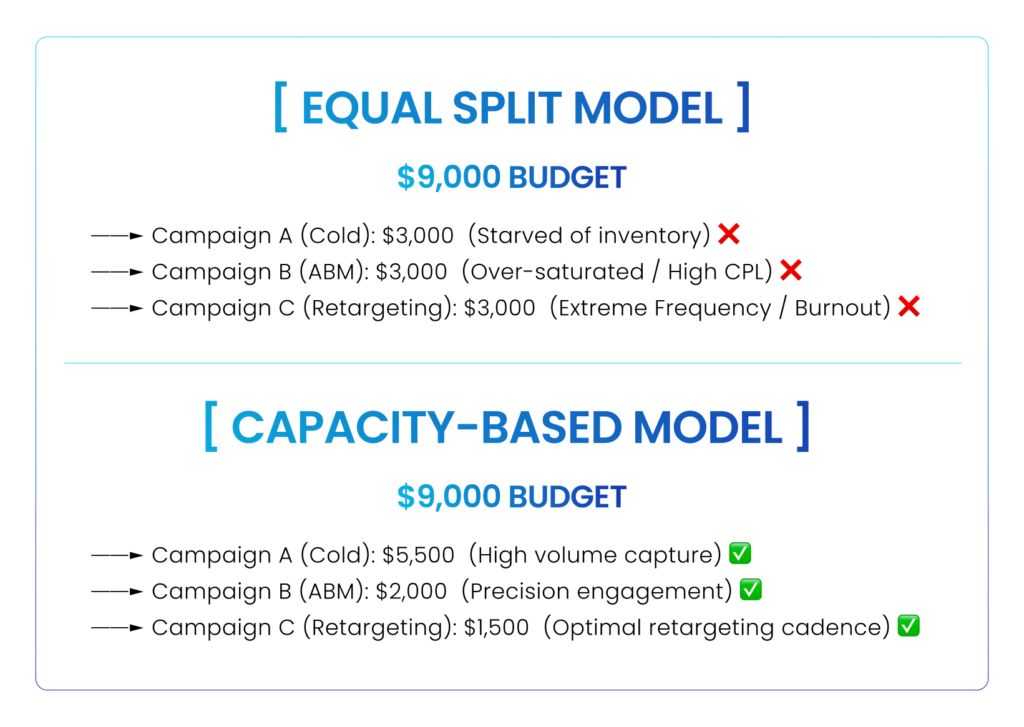
One of the most common habits in B2B paid media is simple math. An advertiser determines their monthly LinkedIn ad budget, say, $9,000, sets up three campaigns, and divides the spend equally: $3,000 per month, or $100 per day to each.
It feels organized, balanced, and fair. But in B2B advertising, equal budget distribution is rarely optimal.
Your LinkedIn ad campaigns do not operate in a vacuum. A cold prospecting campaign targeting 200,000 mid-market executives behaves completely differently from an Account-Based Marketing (ABM) campaign targeting 50 strategic enterprise accounts or a warm remarketing sequence. Treating them identically leads to wasted ad spend, artificially inflated frequency, and starved winning campaigns.
Budget allocation shouldn’t be governed by simple division. It should reflect campaign objectives, audience capacity, funnel positioning, and proven pipeline performance.
Here is how to build a data-driven budget allocation strategy for your LinkedIn Ads that maximizes revenue, protects ROI, and prevents budget fragmentation.
Why Equal Budget Allocation Fails
When you divide a budget equally across campaigns, you make an implicit assumption: that every campaign has the same audience capacity, requires the same data volume to optimize, and delivers the same business value.
In reality, an equal split creates two major structural inefficiencies:
- Starving Large-Audience Engine Campaigns: Broad prospecting campaigns with large, high-intent audiences need sufficient daily budget to gather statistical significance and exit LinkedIn’s learning phase efficiently. Spreading that budget thinly starves them of delivery.
- Over-Funding Niche Campaigns: Niche ABM lists or small retargeting pools cannot absorb large daily spends. Forcing a high budget into a tiny audience simply drives up ad frequency, causes rapid creative fatigue, and inflates your Cost Per Click (CPC).
1. Audience Size Dictates Budget Absorption Capacity
Before deciding how much money to give a campaign, calculate its audience capacity. A campaign’s daily budget must align with the total number of unique accounts or users it can realistically reach without causing immediate ad burnout.
- Broad Cold Prospecting (100,000+ members): These campaigns have high absorption capacity. They can comfortably consume $100 to $300+ per day while keeping ad frequency low and reach wide.
- Micro-ABM Lists (500 to 3,000 members): These campaigns have extremely low absorption capacity. Running $100/day into a 1,200-person audience means hitting the exact same people multiple times a day, burning through your audience within a week.
Rule of Thumb: Match the daily budget to the audience capacity. If an audience is small, keep the daily budget capped, regardless of how much total budget you have left over in your account.
2. Prospecting vs. Remarketing: Getting the Ratio Right
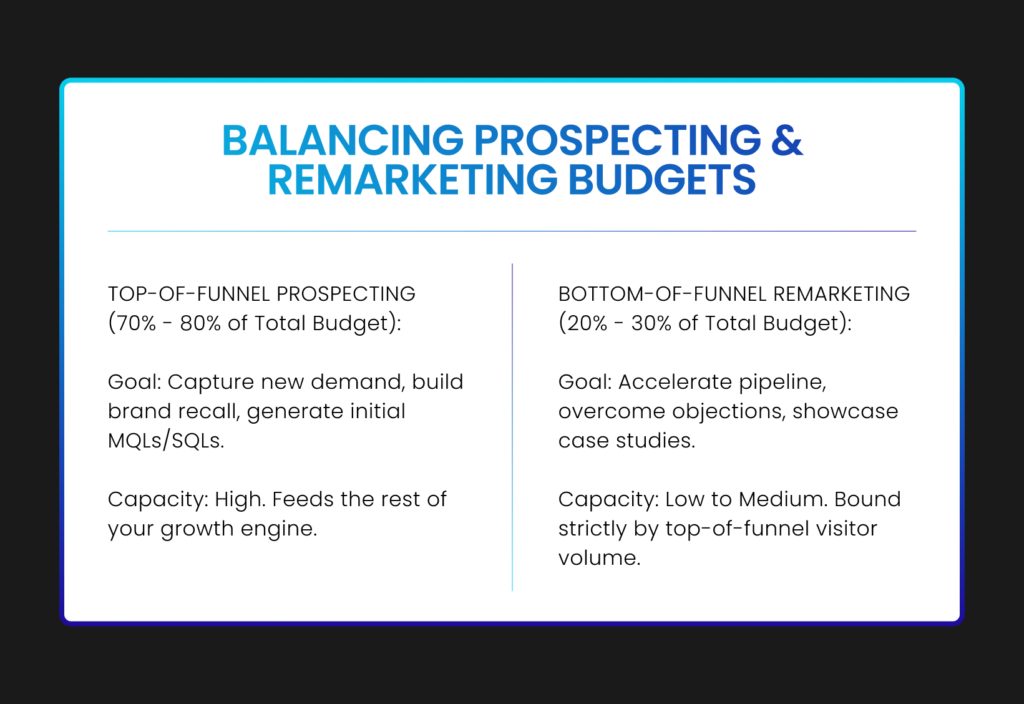
Because remarketing campaigns target warm website visitors or past video viewers, marketers are often tempted to pump a large percentage of their budget into them to “close the deal.”
However, remarketing pools are naturally constrained by your top-of-funnel traffic volume. If you allocate 40% of a $10,000 budget to remarketing, but your website only receives 1,500 unique monthly visitors from target accounts, you will simply drive frequency rather than incremental pipeline.
3. Don’t Spread a Small Budget Too Thin
When launching a new LinkedIn ad account with a modest budget, for example, $3,000 to $5,000 per month, the biggest mistake is attempting to run six different campaigns simultaneously.
Spreading a $3,000 budget across six campaigns leaves each campaign with just $16/day. On LinkedIn, where CPCs can range from $8 to $15+, a $16/day budget yields only 1 to 2 clicks per day per campaign. At that rate, it will take months to gather enough conversion data to evaluate whether a campaign, ad creative, or landing page actually works.
Concentrate your spend. It is far better to run two well-funded campaigns at $50/day that generate actionable performance data within two weeks than six starved campaigns that produce inconclusive noise for three months.
4. Give New Campaigns Room to Learn
Optimization requires patience. Shifting $20 in daily budget back and forth between campaigns based on two days of poor performance prevents LinkedIn’s algorithm from stabilizing and distorts your data.
When testing a new campaign:
- Fund it to a Minimum Threshold: Ensure the campaign receives enough daily budget to generate at least 5 to 10 clicks per day based on your target audience’s average CPC.
- Commit to a Minimum Testing Window: Allow the campaign to run uninterrupted until it reaches a statistically meaningful impression baseline (e.g., 5,000+ impressions) before making budget reallocation decisions.
5. Judge Performance Beyond CPL: The ABM Exception
Budget allocation should follow performance, but Cost Per Lead (CPL) should never be the sole decision metric.
Consider two different campaigns:
- Campaign A (Cold Prospecting / E-book Download): Delivers $35 CPLs, capturing junior managers who rarely convert to closed deals.
- Campaign B (ABM Executive / Document Ad): Delivers $180 CPLs, but 40% of those leads convert into qualified Sales Opportunities (SQLs) with $100k+ contract values.
If you allocate budget purely based on lower CPL, you will shift money away from Campaign B into Campaign A, effectively funding a lower-quality pipeline.
Always evaluate performance using downstream CRM revenue data: Target Account Engagement Rate, Opportunity Creation, and Pipeline Value Generated. High-ticket ABM campaigns often justify higher CPLs because their win rates and deal sizes are vastly superior.
6. What to Do When a Campaign Consistently Underspends
What if you set a $100/day budget for a campaign, but LinkedIn only spends $30/day?,
Underspending is a signal from the auction. It means one of four things:
- Your Audience Is Too Small: The available daily inventory within that targeting criteria has been exhausted.
- Your Bids Are Too Low: If using manual bidding, your bid isn’t competitive enough to win enough daily auctions.
- Your Relevance Score Is Low: LinkedIn’s algorithm prioritizes high-engaging ads. If your CTR is low, the platform limits your ad distribution.
- Targeting Exclusivity: Your target accounts or titles are being outbid by other advertisers during peak hours.
Investigate the root cause, fix the targeting or creative relevance, or reallocate the unspent budget to campaigns capable of absorbing it efficiently.
Your LinkedIn Campaign Budget Is a Ceiling, Not a Target
Many advertisers treat their allocated monthly budget as a target that must be fully spent every month. If they set aside $10,000, they feel disappointed if the account only spends $8,500.
In reality, your budget is a risk ceiling, not a mandatory spend requirement.
The goal of B2B performance marketing is not to spend every dollar available; it is to deploy capital efficiently where there is proven performance to justify it. If your active campaigns cannot absorb additional spend without driving up acquisition costs or over-saturating audiences, it is far better to hold budget in reserve than to force spend into underperforming campaigns.
The Master Budget Allocation Framework
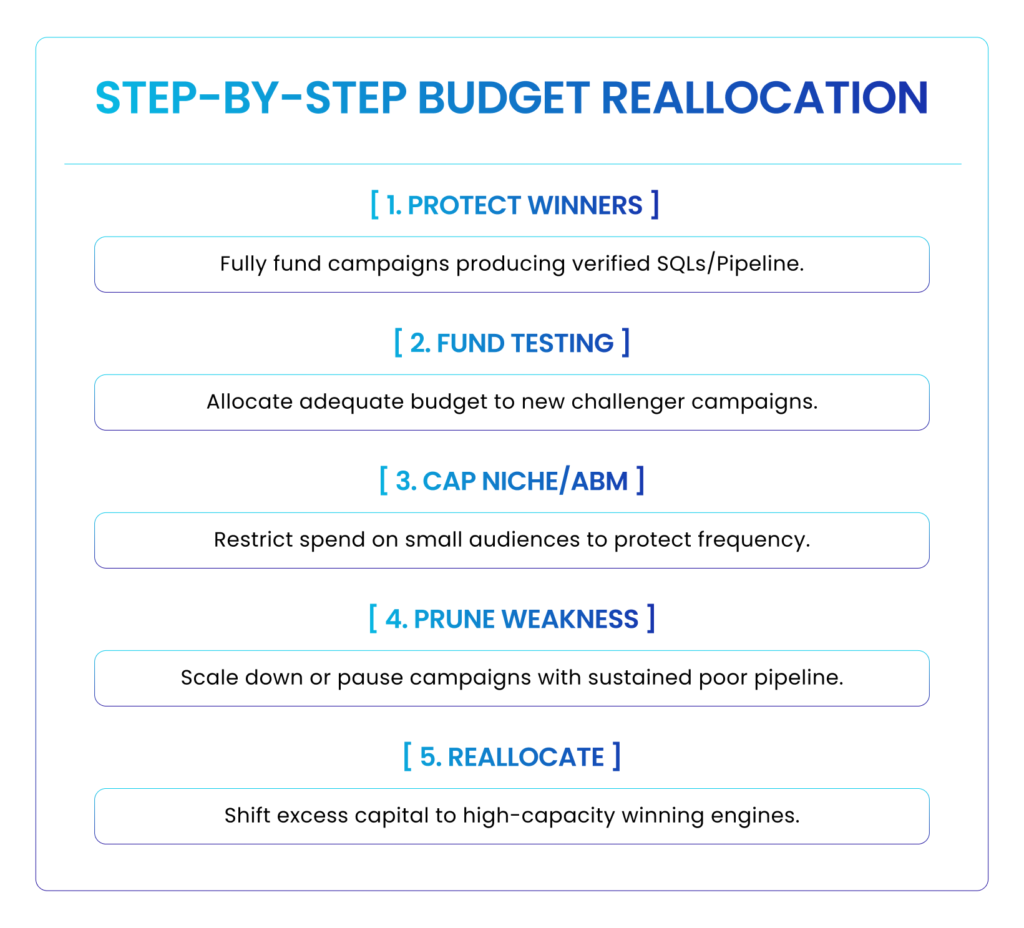
When reviewing your LinkedIn Ads account each month, follow this decision hierarchy to reallocate capital effectively:
Allocate for Revenue, Not Equity
Treating all LinkedIn campaigns equally might simplify campaign management, but it dilutes the efficiency of your marketing dollars.
By aligning budget distribution with audience capacity, funnel stage, and true downstream pipeline metrics, you ensure that every dollar spent on LinkedIn Ads works toward a single goal: generating predictable, high-margin revenue.
LinkedIn ads strategy puzzling you?
Book a free consultation call today